- AI
- Meeting Intelligence
- Recall.ai
- Architecture
- Explainers
How Do AI Meeting Notetakers Actually Work? The Architecture Behind the Bot in Your Zoom Call
That silent participant taking notes in your Zoom call is a distributed system. A plain-language but technically honest tour of how AI meeting notetakers work: calendar sync, meeting bots, transcription, speaker attribution and AI analysis.
An AI meeting notetaker is a software participant that joins a video call the way a human would, records what is said, works out who said it, and turns the conversation into structured outputs: summaries, action items and, in more ambitious products, personalised feedback.
That one sentence hides a surprising amount of distributed systems engineering. This post is a general explainer of how these systems work, whichever product you use or plan to build: technically honest, vendor-neutral where possible, and organised around the five stages every notetaker pipeline shares. If you want implementation-level depth on any stage, this series has a dedicated deep dive for each.
What happens when a notetaker joins your call?
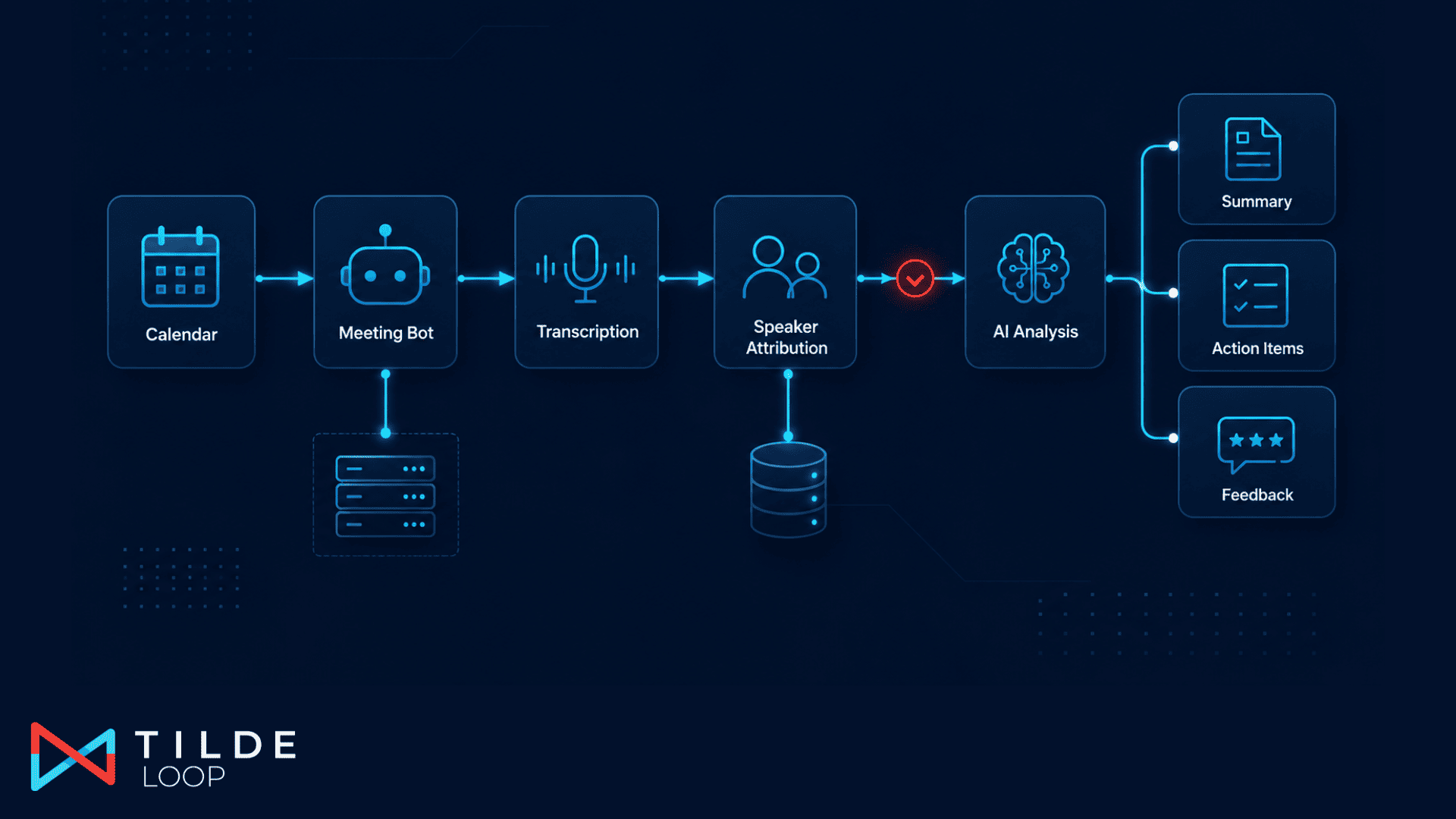
The end-to-end flow, from calendar to insight, looks like this:
- Calendar sync discovers the meeting and its join URL.
- A meeting bot joins the call as a participant and captures audio.
- Transcription converts the audio into speaker-separated text.
- Speaker attribution maps "Speaker 1" to actual people.
- AI analysis turns the transcript into summaries, action items and feedback.
Each stage has its own failure modes and its own engineering trade-offs, so let us take them in order.
Stage 1: how does the notetaker know about your meetings?
Products that require you to paste a meeting link into a form get abandoned within a week. Real notetakers connect to your calendar over OAuth (Google Calendar or Microsoft Outlook) and sync events continuously, watching for entries that carry a meeting URL.
The sync is harder than it sounds. Google and Microsoft model events differently (different ids, different recurrence semantics, different webhook behaviours), so production systems normalise both into one internal event model and key everything on stable external ids. Cancellations matter as much as creations: a deleted meeting must tear down any bot scheduled for it.
Calendar data is also what powers the consent step. A notetaker should join because a user asked it to (per meeting, or through an explicit auto-join preference), never because it technically could.
Stage 2: what exactly is the bot in the participant list?
The bot is a headless meeting client: a program that speaks the meeting platform's protocol well enough to join as a participant, appear in the roster with a name, and receive the audio streams. It runs on a server, not on anyone's laptop.
Building bot clients for Zoom, Teams and Meet in-house means maintaining three reverse-engineered or SDK-based clients and a fleet of media-capable servers. Most products buy this layer from a meeting-bot infrastructure provider such as Recall.ai: you create a bot through an API with a meeting URL and a join time, and you receive lifecycle events (joining, waiting for admission, recording, done) over webhooks.
Two behaviours distinguish good implementations. First, scheduling: the bot is created ahead of time with an explicit join window, so waiting rooms and host admission do not eat the first five minutes. Second, deduplication: when several users of the same product attend one meeting, the platform must send exactly one bot and merge everyone's preferences. That requires keying bots on the meeting itself (in practice, the meeting URL) rather than on any single user's calendar event, and ensuring each user can only access the outputs generated for them.
Stage 3: how does audio become a transcript?
Once the call ends (or continuously, for real-time products), the captured audio goes through automatic speech recognition combined with speaker diarisation. Diarisation is the process of segmenting audio by voice, so the output is not one wall of text but a sequence of utterances each tagged with a speaker label and timestamps.
The critical detail: those labels are usually display names from the meeting platform ("jon s", "Meeting Room 4B"), or anonymous indices when the platform does not expose names. The transcript knows that a voice said something. It does not know who that voice is in your product's terms.
Delivery is asynchronous. Transcription of a long meeting takes real time, so the pipeline is webhook-driven: the infrastructure calls your endpoint when a transcript is ready, and your system must handle duplicate and out-of-order deliveries gracefully. Idempotent ingestion (persist the event, acknowledge immediately, process afterwards) is the pattern that keeps this reliable.
Stage 4: who actually said that?
Speaker attribution is where a transcript becomes personal data with product value, and it is the stage most explainers skip. The problem: match "Ana K" in the transcript to user 7f3a… in the database, without ever matching the wrong person.
The strong prior is the calendar. The event that the bot was scheduled from carries attendee and organiser emails, which resolve to a small set of known users. Display names are then scored against those candidates with normalisation (case, diacritics, pronouns, initials) and matched one-to-one. Production systems solve the final pairing as an optimal assignment problem rather than greedily, because meetings full of colleagues reliably contain similar names, and they keep an explicit "external participant" outcome for anyone below a confidence threshold.
Misattribution is treated as the worst failure. Feedback about a meeting you were not in is a trust-ending bug, so every default leans towards "unmatched" over "guessed".
Stage 5: how does a transcript become notes, action items and feedback?
The final stage feeds the attributed transcript to large language models. Simple products make one summarisation call. More capable ones run a pipeline of focused steps: a neutral summary, schema-validated action item extraction, then personalised outputs (what went well, what to try next time) that combine the transcript with the user's goals and context.
The engineering here looks like any production LLM system: versioned prompts, structured output validation, evaluation datasets to catch regressions, and asynchronous execution so a forty-minute meeting's analysis never blocks anything user-facing. The meeting-specific twist is grounding: every claim in the output should be traceable to the transcript, which is why extraction steps run with low temperature and tight schemas.
What about privacy and consent?
Any honest architecture discussion has to end here, because the system described above records workplace conversations. The controls that matter in practice:
- Explicit consent per meeting, or an explicit standing preference, before a bot ever joins. The bot is visible in the participant list by design.
- User-controlled deletion of transcripts and recordings, honoured through the whole pipeline including derived artefacts.
- Encryption of calendar credentials and tokens at rest, since they are keys to someone's working life.
- Tenant isolation, so one organisation's meetings can never leak into another's analysis.
Frequently asked questions
Does the notetaker record video?
Typically audio is what the pipeline needs; video capture is optional and product-specific. The bot appears as a participant either way, precisely so that recording is never covert.
Can a meeting notetaker join without anyone knowing?
Not in a well-built product. The bot occupies a roster slot with a recognisable name, and platforms increasingly surface recording indicators. Covert capture is both an ethical and, in many jurisdictions, a legal line.
Why did the bot miss the first minutes of my meeting?
Usually waiting-room admission or late scheduling. Good systems create the bot ahead of time with an explicit join time; even then, a host has to admit it on platforms with lobbies.
How accurate is speaker attribution?
With calendar-scoped candidates and optimal assignment, the large majority of internal speakers match with high confidence. Ambiguous cases are deliberately left unmatched rather than guessed.
Real-time or post-meeting?
Both exist. Real-time transcription enables live features but costs streaming infrastructure; post-meeting processing is simpler and suits reflective products. The stages are the same, only the latency budget changes.
Key takeaways
- An AI notetaker is five systems in a trench coat: calendar sync, a meeting bot, diarised transcription, speaker attribution and LLM analysis.
- The bot layer is infrastructure most teams should buy; the data model, deduplication, attribution and analysis are where products differentiate.
- Everything downstream of the call is asynchronous and webhook-driven, so idempotent event handling is the reliability backbone.
- Speaker attribution is the hinge between "a transcript" and "personal insight", and its worst failure is a confident wrong match.
- Consent, deletion and tenant isolation are architectural requirements, not policy documents.